Your comments

Thank you for this suggestion. We will consider this feature request for a future version of Hebcal.

Thanks Rabbi Schlesinger!
This is an excellent suggestion. We will consider this feature for a future version of our Yahrzeit calculator.
You can unsubscribe/remove the original calendar and then re-download from Hebcal with the updated options.
No, sorry.
Correct!
In general, Jewish Holidays begin the evening before the date specified. This is because the Jewish day actually begins at sundown on the previous night. Sometimes, for clarity, the Erev holiday is also included to indicate that the holiday begins the evening before.

This calendar may appear to be coming from Hebcal, but it's not hosted by hebcal.com
Likely the cause is that somebody downloaded a copy of the Hebcal calendar, added their own personal events to it, then accidentally shared it openly on Google Calendar.
To find out how to remove this from your Google calendar (and whom you should contact to let them know that they inadvertently may have published their personal calendar openly), try this:
1. Open your web browser to https://calendar.google.com/
2. Find the calendar you're looking for on the left-land side of the screen under the heading "Other calendars"
3. Hover your mouse and you'll see a 3 vertical dot icon near the name of the calendar that will say "Options for Hebcal Diaspora"
4. Click the 3-dot icon and from the popup menu pick "Settings"
5. If the calendar is an official Hebcal feed, you will see a section called "URL" and you would see something starting with http://download.hebcal.com/...
6. If the calendar is coming from another Google user, you'll see an "Owner" section that looks like "example@gmail.com"
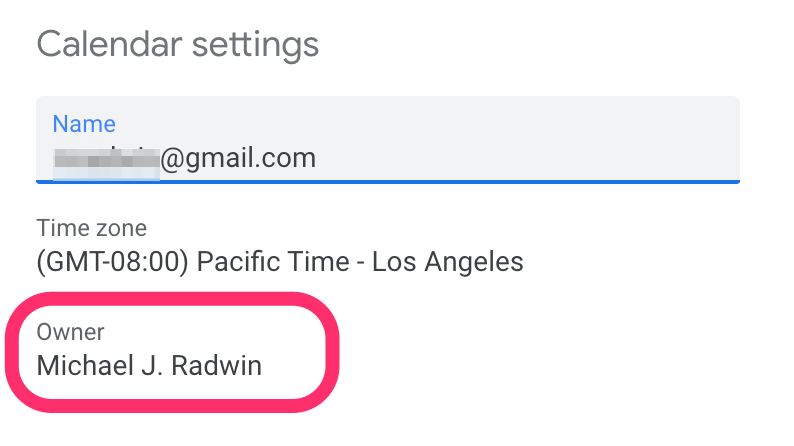
7. Either way, you should click the "Remove Calendar" from the left-hand side. This will take you to a section that says "Remove calendar - By unsubscribing, you will no longer have access to this calendar. Learn more." Go ahead and click the "Unsubscribe" button to confirm.
8. Now you can go back to our standard Google Calendar Jewish holidays download instructions to get a refreshed copy of the holidays directly from Hebcal
Hope this helps!
This calendar may appear to be coming from Hebcal, but it's not hosted by hebcal.com
Likely the cause is that somebody downloaded a copy of the Hebcal calendar, added their own personal events to it, then accidentally shared it openly on Google Calendar.
To find out how to remove this from your Google calendar (and whom you should contact to let them know that they inadvertently may have published their personal calendar openly), try this:
- Open your web browser to https://calendar.google.com/
- Find the calendar you're looking for on the left-land side of the screen under the heading "Other calendars"
- Hover your mouse and you'll see a 3 vertical dot icon near the name of the calendar that will say "Options for Hebcal Diaspora"
- Click the 3-dot icon and from the popup menu pick "Settings"
- If it's coming from our Hebcal servers, you will see a section called "URL" and you would see something like "
- If" class="redactor-autoparser-object">http://download.hebcal.com/...".
- If it's coming from another Google users, you'll see an "Owner" section that looks like "example@gmail.com"
- Either way, you should click the "Remove Calendar" from the left-hand side. This will take you to a section that says "Remove calendar - By unsubscribing, you will no longer have access to this calendar. Learn more." Go ahead and click the "Unsubscribe" button to confirm.
- Now you can go back to our standard Google Calendar Jewish holidays download instructions to get a refreshed copy of the holidays directly from Hebcal
Hope this helps!
Customer support service by UserEcho

not yet. Our current API only supports query by full year or year + month