Your comments


Hi, thanks for the bug report!
You are indeed correct, this is a bug caused by a recent change. We have identified the cause and have pushed out a fix.
Here's the fixed output:
{
  "title": "Hebcal 33°52′N 118°19′W America/Los_Angeles October 2022",
  "date": "2022-10-03T21:57:00.127Z",
  "location": {
    "title": "33°52′N 118°19′W America/Los_Angeles",
    "city": "33°52′N 118°19′W America/Los_Angeles",
    "tzid": "America/Los_Angeles",
    "latitude": 33.87,
    "longitude": -118.33,
    "geo": "pos"
  },
  "range": {
    "start": "2022-10-04",
    "end": "2022-10-05"
  },
  "items": [
    {
      "title": "עֶרֶב יוֹם כִּפּוּר",
      "date": "2022-10-04",
      "hdate": "9 Tishrei 5783",
      "category": "holiday",
      "subcat": "major",
      "title_orig": "Erev Yom Kippur",
      "hebrew": "ערב יום כפור",
      "link": "https://hebcal.com/h/yom-kippur-2022?us=js&um=api",
      "memo": "Day of Atonement"
    },
    {
      "title": "הַדלָקָת נֵרוֹת: 6:15pm",
      "date": "2022-10-04T18:15:00-07:00",
      "category": "candles",
      "title_orig": "Candle lighting",
      "hebrew": "הדלקת נרות",
      "memo": "עֶרֶב יוֹם כִּפּוּר"
    },
    {
      "title": "יוֹם כִּפּוּר",
      "date": "2022-10-05",
      "hdate": "10 Tishrei 5783",
      "category": "holiday",
      "subcat": "major",
      "yomtov": true,
      "title_orig": "Yom Kippur",
      "hebrew": "יום כפור",
      "leyning": {
        "1": "Leviticus 16:1-16:6",
        "2": "Leviticus 16:7-16:11",
        "3": "Leviticus 16:12-16:17",
        "4": "Leviticus 16:18-16:24",
        "5": "Leviticus 16:25-16:30",
        "6": "Leviticus 16:31-16:34",
        "torah": "Leviticus 16:1-34; Numbers 29:7-11",
        "haftarah": "Isaiah 57:14-58:14",
        "maftir": "Numbers 29:7-29:11"
      },
      "link": "https://hebcal.com/h/yom-kippur-2022?us=js&um=api",
      "memo": "Day of Atonement"
    },
    {
      "title": "הַבדָלָה: 7:09pm",
      "date": "2022-10-05T19:09:00-07:00",
      "category": "havdalah",
      "title_orig": "Havdalah",
      "hebrew": "הבדלה",
      "memo": "יוֹם כִּפּוּר"
    }
  ]
}
Hello and Shana Tova,
Do you think you might be able to contribute Ukranian translations to the Hebcal project?
The Shabbat API returns multiple events that occur during the coming week, including of course candle-lighting and Havdalah and the weekly Torah portion. It also may include events like Rosh Chodesh.
If you'd like to ignore Rosh Hashana or other holiday-related events, our general recommendation is for your application to filter the items array in the returned response, paying careful attention to items that meet your application's criteria. For example, you may be interested only in those items that have a category that matches candles, parashat, or havdalah.
Hi, thanks for using the Hebcal Yahrzeit + Anniversary calendar. I'm sorry to hear that you're having trouble with reminders not working correctly on your iPhone 13.
Could you send the calendar URL to mradwin@hebcal.com so we can investigate and assist you directly?
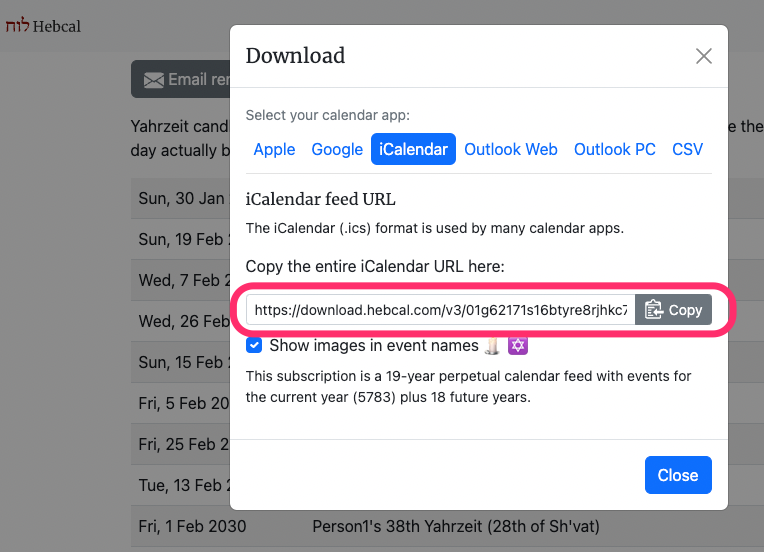
Go to https://www.hebcal.com/yahrzeit in a web browser, and then click on an existing calendar in the "View or edit an existing personal calendar" section of the page.
Then, click the Download button, and iCalendar, and then copy the URL to the clipboard and email it to us.

Hi, thanks for using Hebcal.
If you'd like to include Modern holidays such as Yom haAtzmaut, Yom haShoah, Yom haZikaron on the calendar, please check the box "Modern holidays" when generating your calendar
Shana tova!
Thanks so much for asking!
Except where otherwise noted, content on Hebcal.com is licensed under a Creative Commons Attribution 4.0 International License (sometimes referred to as CC-BY).
This license gives you permission to freely to copy and redistribute the material in any medium or format as long as you give appropriate credit to Hebcal.com.
CC licenses have a flexible attribution requirement, so there is not necessarily one correct way to provide attribution. The proper method for giving credit will depend on the medium and means you are using, and may be implemented in any reasonable manner.
Here are some good (and not so good) examples of attribution.
https://wiki.creativecommons.org/wiki/Best_practices_for_attribution
Shana Tova!
Great. Closing this as fixed.
Hi rbyaffe, we're checking back in to see if Google Calendar eventually refreshed your personal yahrzeit/anniversary calendar?
Shana tova!
Hi, thanks for your question.
This behavior is by design. The Shabbat API always displays the current week's information, including both Friday and Saturday, even if Friday has already passed. No, there is no way to change this behavior by specifying different start/end parameters.
If you want control over date ranges please instead use our Jewish calendar API and specify start and end parameters. The returned JSON is nearly identical to the Shabbat API so it should be easy to transition to this supported API.
Customer support service by UserEcho

Thanks for sending these translations! They are now live on the Hebcal.com website!